Recent Questions
Q: Ok, please disregard my previous email, it was IE 8! I went back to IE 7 and everything is fine.
I do however got requests to speed up the javascript treeview action (of my 2 out of 2 customers thus far on your menus).
Is there a setting to make it go faster?
A: var tXPIterations=5;
You can also try to use AJAX feature. It will increase the loading speed.
Q: How do you go about labeling the various segments of your page to utilize the tab navbar?
A: See, for each item you should assign the ID property of the content
DIV (see data file with your menu parameters).
["Style Name","contentName", "", "", "", "", "1", "", "", ],
["-","", "", "", "", "", "0", "", "", ],
["Style Description","contentDescription", "", "", "", "", "", "", "", ],
["-","", "", "", "", "", "0", "", "", ],
["Style Variations","contentVariations", "", "", "", "", "", "", "", ],
["-","", "", "", "", "", "0", "", "", ],
["Empty","", "", "", "", "", "2", "", "", ],
And on your html page you should create DIV's with such ID.
<div id="contentName" style="height: 0%; visibility: hidden;" class="tabPage">
<p align=center><img src="img/style01_title.gif" width=140 height=90 alt="Glass Style Tabs"></p>
You should paste your content here!!!!!
</div>
<div id="contentDescription" style="height: 0%; visibility: hidden;" class="tabPage">
<p align=center><img src="img/style01_title.gif" width=140 height=90 alt="Glass Style Tabs"></p>
You should paste your description here!!!!!
</div>
You can paste any code within DIV's (PHP, Javascript ...)
Q: I would like to have submenu’s border to be the same for first and second level of submenu.
“Management” item goes over “Staff” item.
I want the same for “Staff” over “Provincial Office”
A: Try to set the following parameters:
//------- Submenu Positioning -------
var topDX = 0;
var DX = 0;
Q: I just purchased your multiple site bundle and have a menu question.
I need to create a menu for a site that has the top level menu have no border but I want any of the sub menu popups to have a border around them (or a different background color for the menu area for the popup). I can not see a way to do this? If a put a menu border on it appears on both the top level and any submenu popups.
A: You should use Individual Item Styles.
You should set the following parameters:
1) var menuBorderWidth=0;
2) Create Submenu Style
var menuStyles = [
["menuBorderWidth=1","menuBorderStyle=solid","menuBorderColor=#7E5927"], //style 0
];
You can do it in Deluxe Tuner. Click "Edit Individual Styles" and thenchoose "Submenu Styles" tab.
3) Assign Individual Style for your submenus.
You can assign them only for the first item in each submenu.
For example:
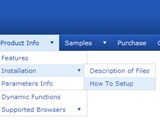
var menuItems = [
["Home","testlink.html", "", "", "", "", "", "", "", ],
["Product Info","", "default.files/icon1.gif", "default.files/icon1o.gif", "", "", "", "", "", ],
["|Features","testlink.html", "default.files/icon2.gif", "default.files/icon2o.gif", "", "", "", "0", "", ], //style 0
["|Installation","", "default.files/icon2.gif", "default.files/icon2o.gif", "", "", "", "", "", ], ["||Description of Files","testlink.html", "default.files/icon6.gif", "default.files/icon6o.gif", "", "", "", "0", "", ], //style 0
["||How To Setup","testlink.html", "default.files/icon6.gif", "default.files/icon6o.gif", "", "", "", "", "", ],
["|Parameters Info","testlink.html", "default.files/icon2.gif", "default.files/icon2o.gif", "", "", "", "", "", ],